


Requestly vs Postman: Which Tool Should Your Team Choose?
If you work in software development or QA, there's one question that comes up again and again:
"Do we use Requestly… or is Postman a better fit?"
Both tools are incredibly popular, but they solve very different problems. Postman is the longtime favorite for backend API testing, while Requestly has emerged as a real-time debugging and network-interception tool that developers and testers love for frontend and browser-level workflows.
But choosing between them isn't always straightforward, especially when your team handles everything from API testing to UI debugging to collaborative development.
In this blog, we'll break things down in a simple way and help you figure out which tool actually fits your team's workflow, skillset, and goals.
What Is Requestly?
Requestly is a developer and QA productivity tool that lets you intercept, modify, mock, and debug network requests directly inside the browser in real time.
It's like combining the best parts of:
- Postman → for mock servers
- Charles Proxy/Fiddler → for network interception
- Chrome DevTools → for debugging
- Browser automation helpers
What Is Postman?
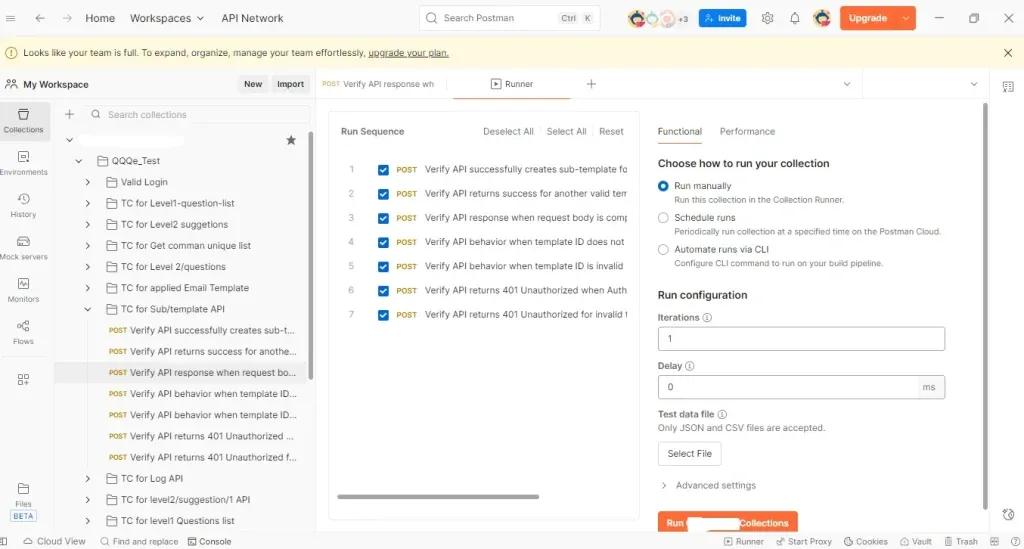
Postman is a widely used tool for API development, testing, and automation. While Requestly focuses on real-time browser debugging, Postman focuses on backend API control, making it ideal for structured, repeatable, and automated API testing.
Postman acts as your API command center, where you can:
- Send and test API requests
- Create automated test suites
- Run workflows and chained calls
- Use mock servers
- Document APIs
- Schedule monitors
- Integrate tests with CI/CD
Key Features of Requestly
1. Live Network Interception (Real-Time)
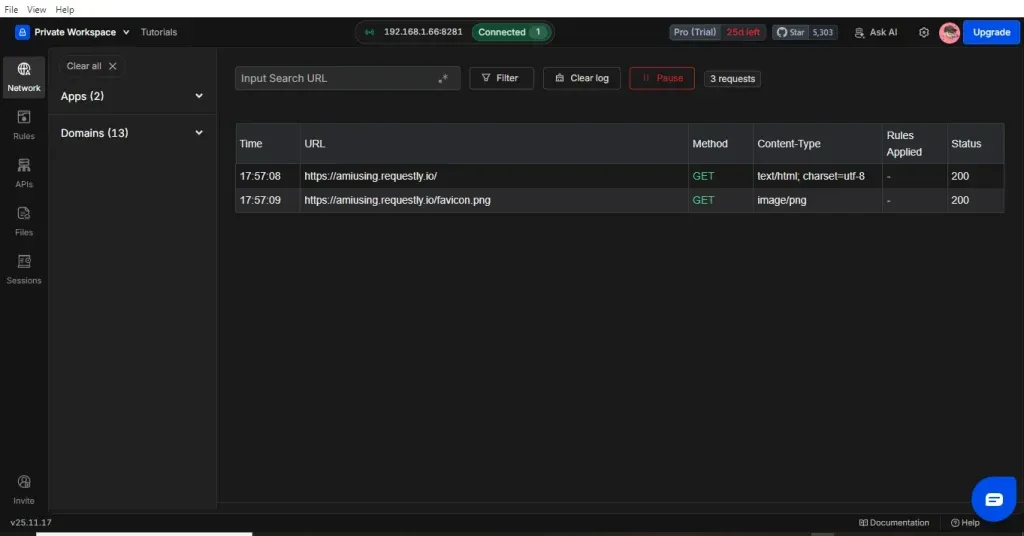
Requestly sits between your browser and server, allowing you to intercept every outgoing API request in real time. You can instantly:
- Change the request URL
- Modify headers
- Edit the request body
- Block specific requests
- Redirect requests to a mock server
- Dynamically modify the response before it reaches the UI
This type of browser-level interception is NOT possible in Postman.
2. No-Code Rule Builder
Modify API behavior visually without touching code:
- "Replace /v1/products with /v2/products."
- "Return a 500-error status"
- "Inject custom JSON into the response."
- "Send a different auth token."
Perfect for QA testers and front-end developers who don't want to configure code or environments.
3. Real-Time Mock Server
Instantly mock any API and attach it directly to your running UI.
Example:
Is the backend still building GET /wishlist?
Mock the endpoint and return dummy JSON, so frontend work continues without delays.
In Postman, mock servers exist but do not bind automatically to browser traffic unless the frontend manually changes API URLs.
4. Session Recording
Record everything your browser does:
- All API calls
- Response and request payloads
- Timing information
- Headers & cookies
- Errors
Great for bug reproduction and developer handoff.
Postman cannot record live browser sessions; it only logs manually created requests.
5. Quick Debugging Without Touching Code
Test critical UI scenarios without modifying the backend or frontend:
- How the UI behaves on 500 errors
- How the app loads on slow API responses
- How empty or malformed JSON impacts the UI
- How unauthorized, expired-token, or forbidden flows behave
All done visually and instantly.
6. Cross-Browser Support
Works as an extension across major browsers (Chrome, Firefox), letting teams debug APIs directly within their actual browsing environment.
7. Environment-Specific Rules
Create different sets of rules for:
- Dev
- QA
- Staging
- Production
Makes testing flow smoother and environment switching effortless.
8. Easy Import/Export
You can:
- Export rules, mocks, and session recordings
- Import Postman collections directly
- Share configurations easily across teams
9. API Client (Free Forever)
Requestly includes a free, open-source API client, offering:
- Environment variables
- Request history
- Workspace organization
- Quick request testing
- Lightweight alternative to heavy API tools
Pricing
- Free Forever: API Client is 100% free & open source
- Optional Paid Plans: Only for team collaboration and advanced enterprise features
- Best Value: Ideal for QA and frontend teams needing browser-level debugging at zero cost
Limitations of Requestly
Requestly is not built to replace Postman or act as a full API test automation tool.
It does NOT support:
- Scheduled API tests
- CI/CD integration
- API documentation workflows
Key Features of Postman
1. API Request Building & Testing
Send and test REST, SOAP, and GraphQL API calls with full control over:
- headers
- query parameters
- request bodies
- authentication settings
2. Automated Test Scripts
Use JavaScript-based assertions to validate responses automatically.
Great for building structured API test suites.
3. Collections & Workflows
Organize requests into collections and execute them in sequences, ideal for microservices and backend teams.
4. Mock Servers
Create mock servers to simulate backend APIs when real endpoints aren't ready.
Used heavily during API-first development.
5. Monitoring & Scheduled Runs
Set up monitors that run APIs on schedule (every minute/hour/day) to ensure uptime and performance.
6. CI/CD Integrations
Seamlessly integrate with:
- Jenkins
- GitHub Actions
- GitLab
- Azure DevOps
Run automated API tests in pipelines effortlessly.
7. API Documentation
Automatically generate and publish API documentation with schema validation and versioning.
8. Environment & Variable Management
Create multiple environments (dev, QA, staging, and prod) using environment variables to streamline API testing.
9. Collaboration Workspaces
Team workspaces with version control, roles, and sharing make Postman ideal for large engineering teams.
Postman – Pricing
- Free Plan: Basic individual use
- Paid Plans: ~$19/user/month (monthly) or ~$14/user/month (annual)
- Enterprise Plans: Higher pricing based on governance and workspace needs
Cost Consideration: Becomes expensive for large QA/Dev teams
Limitations of Postman
- Cannot intercept real browser traffic
- No real-time request/response modification (can't rewrite, block, inject JSON, or simulate errors live)
- Mock servers don't auto-connect to UI (frontend must change URLs manually)
- No browser session recording
- Advanced features require paid plans
- Not suitable for UI-level testing (strictly backend/API-focused)
If you want to explore more tools beyond Postman and Requestly, we've also published a detailed guide on the best API testing tools that compares the top frameworks used in modern QA teams.
If you're evaluating tools for your engineering team, let's talk.
Let's build a smarter testing strategy together.
Comparison Overview: Requestly or Postman
| Feature/Factor | Requestly | Postman |
|---|---|---|
| Primary focus | Browser-based network interception, real-time modification, debugging + Free API Client | Full-lifecycle API development and testing |
| Browser traffic interception | Yes, real-time browser ↔ server interception | No |
| API Client (sending API requests) | Yes, completely free forever & open source | Yes, but advanced features require paid tiers |
| Mock server integration | Easy, real-time, tied to browser traffic | Strong but needs manual URL changes for frontend |
| No-code rule builder | Visual rule builder | Scripting-based, not visual |
| Session recording (browser) | Yes | No |
| Backend API automation & CI/CD | Not supported | Full support |
| Collaboration & workspaces | Good for UI/QA teams | Strong enterprise-level collaboration |
| Pricing | Free Forever (API Client). Premium for extras. | Free for small users; paid plans start at ~$19/user/month. |
| Best for | Frontend Devs, QA teams, testers | Backend engineers, API testers, automation teams |
| Limitations | Not for automated API test suites | Doesn't intercept browser traffic |
Requestly vs. Postman: Which One Should Your Team Choose?
Here's the simplest way to decide.
Choose Requestly if your team needs:
- Real-time debugging inside the browser
- Frontend–backend decoupling
- Mock APIs without code changes
- Quick reproduction of bugs
- Visual request/response modification
- Tools to speed up QA
- Session recording for collaboration
- A no-code workflow
Requestly is best for frontend developers, QA teams, and testers who want to debug UI behavior quickly.
Choose Postman if your team needs:
- Structured API test cases
- Automated execution
- CI/CD integration
- Backend-focused API workflows
- API design + documentation
- Collection-level organization
- End-to-end API testing
- Monitoring & reporting
Postman is best for backend developers and API testers who need deep control over API validation.
Conclusion
Choosing between Requestly and Postman isn't about which tool is "better", it's about which one fits the job.
If your work revolves around browser-level debugging, UI testing, real-time API manipulation, or reproducing tricky bugs, then Requestly gives you unmatched speed and flexibility. Its ability to intercept requests, mock APIs on the fly, and modify responses without touching any code makes it a must-have tool for front-end developers and QA testers.
If your focus is backend API development, structured test suites, automation, and CI/CD pipelines, then Postman remains the industry standard. It's powerful, mature, and built for large-scale API workflows.
Together, they give your team full coverage from UI to API, ensuring faster releases, fewer bugs, and a smoother development cycle.
If you're looking to enhance your API or UI testing strategy, our automation testing services can help you implement the right tools and practices to build a faster, more reliable workflow.